If you’re searching for a cloud storage service that puts privacy above everything else, one of the best options in the market is Proton Drive. Developed by the Swiss company behind Proton Mail, this encrypted Proton Drive cloud storage solution offers something most competitors don’t: genuine end to end encryption where only you can access your files.
But is that enough?
I’ve been testing Proton Drive extensively across web, desktop, and mobile platforms, and the answer depends entirely on what you’re willing to sacrifice. A Proton account is required to access Proton Drive’s features and manage your files securely with end-to-end encryption.
This Proton Drive review breaks down exactly what works, what frustrates, and who should actually make the switch in 2026.
Proton Drive launched publicly in September 2022 and has evolved significantly through 2025 and into early 2026. It now includes native Windows and Mac apps, robust mobile apps for iOS and Android, and integration with Proton Docs for document editing. However, there’s still no native Linux client, collaboration features trail behind Google Docs considerably, and the price per gigabyte runs higher than mainstream alternatives.
The service fits neatly into Proton’s broader ecosystem—alongside Proton Mail, Proton Calendar, Proton VPN, and Proton Pass—creating what the company calls a privacy-first suite.
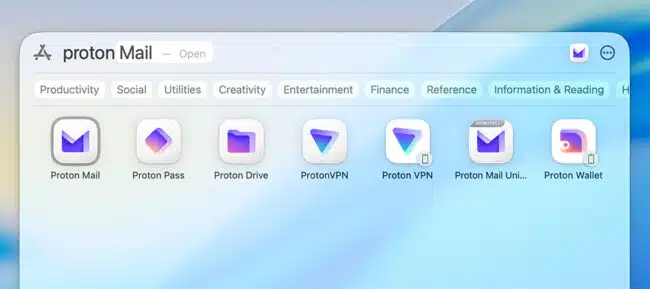
If you already trust Proton with your email, extending that trust to your personal files makes logical sense. Proton Drive is ideal for high-security storage when used as part of the Proton ecosystem.
Quick Summary:
| Aspect | Verdict |
|---|---|
| Best For | Privacy-focused professionals, journalists, activists, Proton ecosystem users |
| Strengths | End to end encrypted by default, Swiss privacy laws, open source code, strong mobile apps |
| Weaknesses | No Linux client, higher cost per GB, limited collaboration features |
| Free Plan | 5GB shared across all Proton apps |
Key Takeaways: Who Proton Drive Is (and Isn’t) For
Before diving deeper, let’s clarify whether Proton Drive actually matches your needs. This section saves you time if your priorities don’t align with what the service offers.
Core Advantages:
- End to end encryption by default—even the provider cannot access your files
- Swiss headquarters outside Five Eyes intelligence alliance, protected by swiss privacy laws
- Open source clients available on GitHub for transparency
- Seamless integration with Proton Mail, Proton VPN, Proton Calendar, and Proton Pass
- Strong mobile apps with automatic photo backup feature
- No file size limits on any plan
Core Drawbacks:
- No native Linux client (web app or command-line workarounds only)
- More expensive per GB than Google Drive, OneDrive, or IDrive
- Collaboration features are basic compared to Google Docs
- Sync performance occasionally lags during large batch uploads
- Search limited to metadata due to encryption constraints
Ideal Users:
- Journalists storing source materials or interview transcripts
- Activists who need private and secure storage for sensitive data
- Medical or legal professionals handling confidential client files
- Families who prioritize privacy over raw storage space
- Anyone already invested in the Proton suite
Better Alternatives Exist If:
- Your team needs real-time document collaboration with 10+ people
- You’re a video editor syncing 4K footage constantly
- You’re locked into Microsoft 365 or Google Workspace workflows
- Budget per GB matters more than encryption
Plans, Pricing & Storage Limits in 2026
Proton’s pricing reflects its premium positioning. You’re paying not just for storage space but for an entire privacy ecosystem. Here’s what each plan offers as of early 2026.
| Plan | Storage | Price (Mo/Yr) | Key Inclusions |
|---|---|---|---|
| Free | 5GB shared | $0/0 | Basic Proton Mail, Drive access, full encryption |
| Drive Plus | 200GB | $4.99/$3.99 | Version history up to 10 years, Proton Docs |
| Proton Unlimited | 500GB | $12.99/$9.99 | Full Mail, VPN, Pass, Calendar access |
| Proton Duo | 1TB (2 users) | $19.99/$14.99 | Shared storage for couples/partners |
| Proton Family | 3TB (up to 6 users) | $29.99/$23.99 | Central admin controls, family plan features |
| Business | 1TB/user | $9.99/$7.99/user | Custom domains, admin tools, SSO options |
- Free plan available to try;
- 30 day money back guarantee for all plans;
- Family plans, business plans and the popular “Proton Unlimited” that includes all privacy apps.
- Full, end-to-end encryption.
The free plan offers 5GB of free storage shared across all Proton services—generous for light document storage but tight if you’re backing up photos. There’s no storage limit increase without paying, though you can earn small bonuses through referrals.
Value Comparison:
Looking at raw numbers, Proton Unlimited costs roughly $0.02/GB/month versus Google One’s 2TB at about $0.0075/GB/month. That’s nearly three times the cost per gigabyte.
However, Proton Unlimited bundles services that would otherwise cost $20+/month separately: premium email with 15 custom domains, VPN for 10+ devices, a premium password manager with unlimited email aliases, and an encrypted calendar. If you’d use those tools anyway, the paid proton drive plan becomes more economical.
Proton frequently runs promotions—40-50% off annual subscriptions or $1 first-month trials for Drive Plus. A 30-day money-back guarantee removes the risk of trying paid plans.
Apps, Interface & Ease of Use
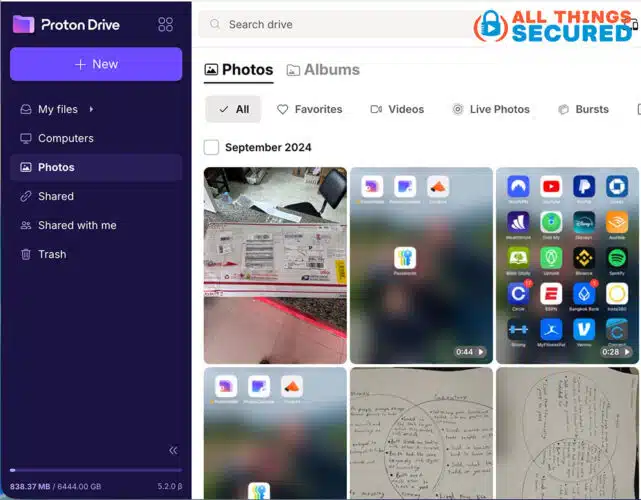
The Proton Drive web app feels immediately familiar if you’ve used Google Drive or Dropbox. As a proton drive cloud storage platform, it offers a left sidebar with navigation for My Files, Shared with me, Trash, and a storage meter showing usage. The main panel displays files in grid or list view with drag-and-drop upload files functionality.
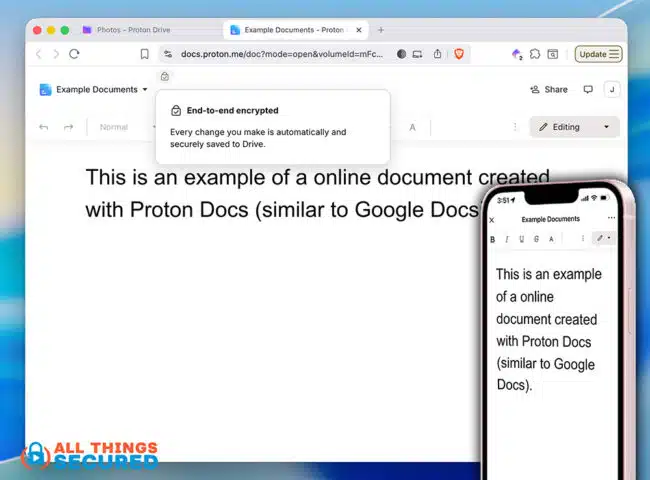
Proton Docs integration lets you create and edit documents directly in the browser. Click “New” and choose document or spreadsheet to launch the editor. It handles basic features well—headings, tables, comments, lists—but don’t expect pivot tables or macros. The file manager keeps everything organized with standard folder hierarchies.
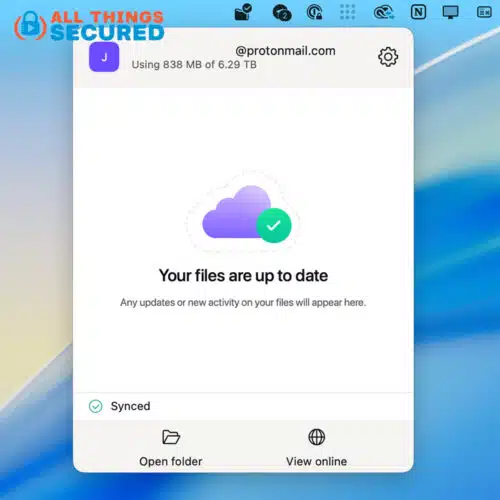
The desktop app for Windows (Windows 10/11) and the Mac app (macOS Ventura/Sonoma) create virtual drives that appear alongside your local storage. You can choose selective sync to exclude large files from local storage space, or use online-only placeholders that download on demand. Both apps show sync status icons directly in your file explorer.
To access and sync files across devices, you must log in with your Proton account, which ensures secure authentication and access to all Proton Drive features.
Linux users face the biggest friction. As of early 2026, there’s no native Linux client. You’re limited to the Proton Drive web app for uploads and downloads, or third-party tools like rclone configured with Proton’s WebDAV endpoint. Privacy communities on Reddit report various workarounds involving Docker containers, but none match the seamless experience on Windows or macOS.
The Proton Drive mobile app works well on both platforms. The Android app (Google Play) and iOS app (iOS 16+) support automatic photo and video backups in original quality, biometric authentication, and offline access to starred files. Navigation mirrors the web interface, making it easy to access important files on the go.
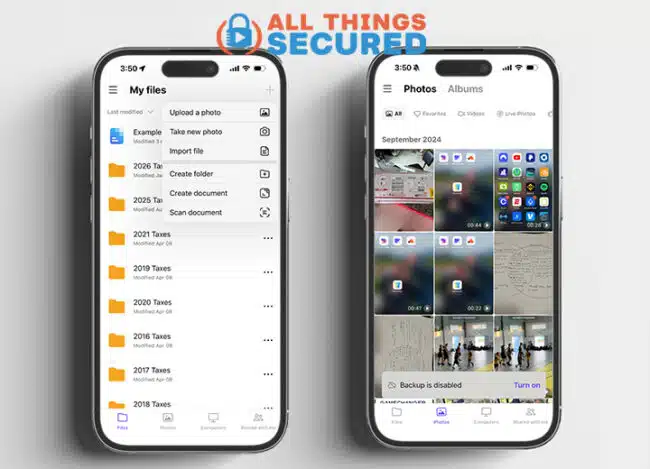
Search works on filenames and tags across all platforms. Full-text search remains limited by encryption—Proton cannot index your file contents when they’re end to end encrypted. The company’s roadmap mentions searchable encryption improvements for 2026-2027.
Ease of Use Verdict:
- Intuitive for basic file operations
- Learning curve increases for API integrations or scripting
- Limited preview support for specialized formats (CAD, some video codecs)
- Web and mobile search limited to metadata only
Storing, Syncing & Performance
Reliable syncing matters as much as storage capacity. After I reviewed Proton Drive across multiple devices over several weeks, here’s what to expect:
- Desktop clients support block-level syncing, meaning only changed portions of files upload rather than entire files.
- Virtual drive mode fetches data on-access, conserving bandwidth when you’re working with large files you don’t need locally.
- You can mark specific files or entire folders for offline access on both desktop and mobile.
- Upload speeds average 80-100MB/s on gigabit connections, comparable to OneDrive and Google Drive. A 1GB file typically transfers in 2-3 minutes over fast connections. However, batch uploads of 100+ files can run 20-30% slower due to per-file key generation—the encryption overhead that makes Proton secure also adds processing time.
The sync status indicator shows progress, and pause/resume controls let you manage bandwidth during video calls or other intensive network usage. Conflict resolution favors server versions, renaming local conflicts as “filename (conflict).ext”—less sophisticated than Dropbox’s unified diffs but functional.
Error messages remain frustratingly vague. “Sync failed—check connection” doesn’t help diagnose whether the problem is network-related, permission-based, or something else entirely. This is an area where mainstream providers offer better troubleshooting.
- Version history preserves previous file states within your storage quota. Drive Plus users retain changes for up to 10 years or until storage exhausts—useful when you need to restore files after accidental overwrites. Right-click any file to view and restore previous versions.
- Mobile backups prove consistent. Photos appear across devices within 5 minutes on Wi-Fi, with minimal battery drain (2-3% hourly on recent iPhones). CPU usage spikes modestly during encryption (10-20% on M1 Macs), lower than some competitors.
Proton Drive Sync Verdict:
Solid for personal workflows and small teams. Heavy multi-device collaboration or constant large file syncing may hit occasional bottlenecks.
File Sharing, Collaboration & Proton Docs
Proton Drive prioritizes security over collaborative convenience. This design choice protects your data but limits how you can share files and work with others.
To share files, right-click any file or folder and create secure links. Options include password protection, expiration settings (from 1 hour to never), and view/download permissions. Recipients don’t need Proton Drive accounts to access shared content—they download through temporary secure sessions.
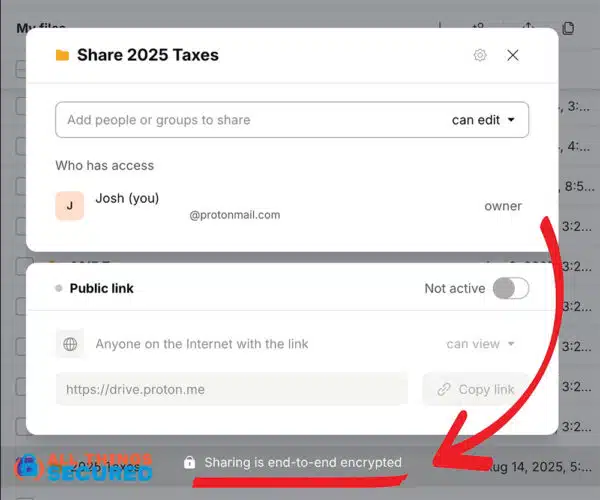
For a practical example: a journalist could create a passworded folder containing interview transcripts, share the link with an editor, and both could review documents without exposing metadata or IP addresses.
The secure storage approach means even Proton cannot see what’s being shared.
Proton Docs enables real-time collaboration on documents. Multiple users see each other’s cursors, can leave comments, and track changes. It handles reports, meeting notes, and basic project documents adequately.
However, Proton Docs trails Google Docs significantly:
- No offline editing capability
- Limited embeds and formatting options
- Basic spreadsheet formulas (Proton Sheets launched late 2024)
- No slides or presentations yet
- Collaboration features optimized for 2-4 users, not large teams
There’s no Slack or Teams integration, no public workspaces, and limited role-based access controls. Proton Drive users who need intensive collaboration often maintain separate Google Workspace or Microsoft 365 accounts for those workflows.
Sharing Summary:
- Excellent for secure one-way file distribution
- Adequate for small-team document review
- Insufficient for 10+ person real-time brainstorming
- Perfect for privacy-sensitive document exchange
- Free plan available to try;
- 30 day money back guarantee for all plans;
- Family plans, business plans and the popular “Proton Unlimited” that includes all privacy apps.
- Full, end-to-end encryption.
Security, Encryption & Privacy
Security forms the foundation of Proton Drive’s entire value proposition. This isn’t marketing speak—the technical implementation backs up the claims.
End to end encryption means your files are encrypted on your device before upload files reach Proton’s servers. Encryption keys derive from your password via scrypt/PBKDF2, and Proton never holds copies. Even under legal compulsion, Proton cannot decrypt your data because they physically cannot access the keys.
Technical protections include AES-256 encryption for stored data, HTTPS/TLS 1.3 for data in transit, and encrypted metadata (filenames obscured in indexes). This differs fundamentally from server side encryption used by Google Drive and OneDrive, where providers encrypt data on their servers but retain access to plaintext for scanning, indexing, and compliance.
Swiss privacy laws provide additional protection. Switzerland sits outside the Five Eyes, Nine Eyes, and Fourteen Eyes intelligence-sharing alliances. Proton’s transparency report has disclosed zero data handovers for Drive content. A data breach at Proton’s servers wouldn’t expose your files in readable form.
Transparency measures strengthen trust:
- Open source code for all clients (AGPLv3 license on GitHub)
- Third-party security audits by Securitum (2024-2025) confirmed no backdoors
- $100K+ bug bounty program with active vulnerability fixes
Account-level protections include two-factor authentication via TOTP apps or 2FA hardware security keys (YubiKey FIDO2 supported). App logs show login history, and suspicious activity triggers alerts. A Proton account is required to access Proton Drive and manage files securely, serving as the main authentication method for all Proton services.
Higher-tier Proton apps include Proton Sentinel—AI-driven anomaly detection for high-risk accounts—and Dark Web Monitoring to alert you if credentials appear in breaches.
Security Highlights:
- Zero-access architecture: Proton cannot read your files
- Client-side encryption before upload
- Swiss jurisdiction with strong privacy protections
- Regular independent security audits
- Open source clients for community verification
- Hardware security key support for 2FA
Limitations: Encrypted search is metadata-only. Lost passwords mean unrecoverable data. Some convenience features common in other cloud storage providers simply aren’t possible with true end-to-end encryption.
Privacy vs Convenience: Trade-Offs in Daily Use
Proton Drive makes deliberate trade-offs. Understanding them helps you decide whether the privacy benefits justify the friction.
Where privacy removes convenience:
- No deep integration with Adobe Creative Cloud, Microsoft Office, or other third-party productivity apps
- No native Linux client despite strong demand from privacy communities
- Limited real-time collaboration compared to Google Docs
- Search cannot index file contents, only filenames and tags
- Some file types lack in-app previews
Where the trade-off clearly favors privacy:
- Storing legal documents or contracts that must remain confidential
- Journalist source materials and interview recordings
- Medical records or HIPAA-sensitive information
- Family photos you don’t want scanned by AI or used for ad targeting
- Activist materials in politically sensitive regions
User surveys on Proton’s blog (2025) showed 92% satisfaction among privacy-prioritizers versus 65% satisfaction among users focused primarily on speed or collaboration. That gap reflects the fundamental positioning.
Some Practical Advice:
Many Proton Drive users maintain hybrid setups. Protect important documents and sensitive data in Proton Drive while using Google Drive or OneDrive for low-risk collaboration projects. This mixing approach lets you protect important documents without abandoning convenient tools entirely.
When to Choose Privacy:
- Files contain legally sensitive or personally identifying information
- You operate in high-risk environments (journalism, activism, legal work)
- You fundamentally object to your data being scanned, indexed, or monetized
How Proton Drive Compares to Google Drive, OneDrive & IDrive
Choosing between cloud storage providers depends on your priorities. Here’s how Proton Drive stacks against the major alternatives.
Google Drive:
- 15GB free storage, expanding via Google One subscriptions
- Superior AI-powered search and Google Docs collaboration
- Deep integration with Gmail, Google Photos, Google Workspace
- Weakness: Data is scanned for ads and subject to broad US legal access
- No end-to-end encryption by default
Microsoft OneDrive:
- 5GB free, bundled with Microsoft 365 subscriptions
- Excellent Windows integration and Office document collaboration
- Strong for enterprise environments
- Weakness: Server-side encryption means Microsoft can access content
- Subject to US CLOUD Act requests
IDrive:
- Competitive pricing: 5TB for roughly $80/year
- Strong backup features including continuous imaging
- Good for large files and archival storage
- Weakness: Optional (not default) end-to-end encryption
- US-based with different threat model than Swiss providers
Proton Drive Unique Position: Proton Drive is a proton drive cloud storage solution that stands out as the only mainstream option offering end-to-end encryption by default combined with Swiss data protection and a complete privacy ecosystem. Accessing Proton Drive requires a Proton account, which is designed for secure, privacy-focused authentication and is necessary for storing, sharing, and managing files securely. If you’re seeking secure and private alternatives to big tech cloud storage, no competitor matches this combination.
| Feature | Proton Drive | Google Drive | OneDrive | IDrive |
|---|---|---|---|---|
| Default E2E Encryption | ✓ | ✗ | ✗ | ✗ |
| Swiss Jurisdiction | ✓ | ✗ | ✗ | ✗ |
| Collaboration Tools | Basic | Excellent | Excellent | Limited |
| Price per GB | Higher | Lower | Lower | Lowest |
| Privacy Suite Integration | ✓ | ✗ | ✗ | ✗ |
For other cloud storage services, the choice is simpler: if privacy matters most, Proton wins. If collaboration or cost efficiency matters more, mainstream providers pull ahead.
User Experience on Mobile: Android & iOS
Many Proton Drive users rely primarily on mobile apps for photo backups and quick document access. Both platforms deliver solid experiences with privacy as the foundation.
- Android (Google Play): The Proton Drive Android app supports automatic photo and video backup in original quality (HEIC/HEVC supported). Files upload in the background without constant attention. You can browse folders, create secure links with passwords and expiration settings, and mark files for offline access. Biometric authentication (fingerprint or face ID) adds security without friction. The Play Store rating sits at 4.7/5, reflecting generally positive user reception.
- iOS (iOS 16+): The Proton Drive iOS app experience mirrors Android closely. Background photo backup works reliably, and Files app integration allows seamless access alongside local storage. Recent updates (v4.2.1) fixed bulk upload issues that some users reported. HEIC efficiency keeps storage usage reasonable for photo-heavy users.
Both apps support 20+ languages and accessibility features including VoiceOver (iOS) and TalkBack (Android). In app report options help Proton address bugs quickly.
Mobile Limitations:
- Search still catches up to web/desktop—metadata only, no content search
- Some file types (ZIPs, certain video formats) require external apps
- Internet connection required for non-offline files
- Delete files happens immediately (check Trash before emptying)
Why Mobile Users Choose Proton:
- Photos stay end to end encrypted unlike Google Photos or iCloud
- No AI scanning or facial recognition on uploaded images
- Automatic backups protect against device loss without privacy compromise
- Securely organize photos and documents across devices
Customer Support: Help When You Need It
When it comes to cloud storage, having reliable customer support can make all the difference—especially when your personal files and sensitive data are at stake. Proton Drive recognizes this, offering a robust support system that matches its commitment to security and privacy.
Whether you’re using the Proton Drive web app, desktop app, or the Proton Drive mobile app, help is always within reach. Users can access a comprehensive knowledge base packed with FAQs, step-by-step guides, and troubleshooting tips. These resources are regularly updated to reflect the latest Proton Drive features, ensuring that both free plan and paid Proton Drive plan users have the most current information at their fingertips.
For those moments when you need more than a guide, Proton Drive provides responsive email support. The support team is well-versed in the nuances of end to end encryption and secure cloud storage, so you can expect knowledgeable answers to questions about everything from file sharing to restoring files or managing your storage space. If you encounter an issue while using the mobile apps or web app, the in app report feature lets you submit feedback or report problems directly—streamlining the process and helping Proton’s team address concerns quickly.
Security and privacy aren’t just buzzwords for Proton Drive—they’re built into every aspect of the cloud storage service, including customer support. Even the provider cannot access your encrypted files, and the support process is designed to protect your privacy at every step. Support staff are trained to handle inquiries confidentially, and no sensitive data is ever exposed during troubleshooting.
Beyond official channels, Proton Drive benefits from an active user community. Forums and social media groups are filled with Proton Drive users sharing tips, best practices, and solutions for common questions. This peer-to-peer support can be especially helpful for those new to encrypted cloud storage or looking to get the most out of features like the Proton Drive mobile app or desktop app.
Whether you’re just starting out with the free encrypted cloud storage plan or managing important files on a paid Proton Drive plan, you can count on Proton’s support resources to help you securely organize and access your data. With a blend of self-help tools, responsive personal assistance, and a privacy-first approach, Proton Drive stands out as a cloud storage provider that truly supports its users—every step of the way.
Roadmap, Updates & Long-Term Outlook
Proton Drive has evolved rapidly since its 2022 launch. The trajectory suggests continued improvement without compromising the privacy foundation.
Recent Additions (2022-2026):
- File and folder sharing with secure links
- Version history with multi-year retention
- Proton Docs (late 2024) and Proton Sheets for document editing
- Mac app and improved Windows app with virtual drive support
- Enhanced mobile apps with bulk upload and improved sharing
Publicly Signaled Roadmap:
- Encrypted full-text search via searchable encryption (Q1 2026 beta)
- Linux client (community-driven development, mid-2026 estimated)
- Expanded Proton Docs: presentations and slides
- Richer file previews via client-side decryption
- Business SSO and compliance improvements
Proton’s track record across Mail, VPN, and Pass demonstrates they ship promised features. Proton Docs went from concept to functional collaboration tool in roughly 18 months. Users can reasonably expect similar iteration on Drive.
Reasonable Expectations (2026-2027):
- Linux client will likely arrive, addressing the most vocal user request
- Collaboration features will improve but probably won’t match Google Docs depth
- Search will become more useful as encrypted search matures
Conclusion: Should You Switch to Proton Drive?
After extensively reviewing Proton Drive, the verdict is clear: it’s one of the best free encrypted cloud storage options available in 2026, but it demands accepting real trade-offs.
The strengths are substantial. End to end encryption means your personal files securely stay private—not just promised private, but mathematically impossible for anyone else to access. Swiss jurisdiction provides legal protection that US-based services cannot match. Open source clients mean security claims are verifiable. The integration with Proton Mail, Proton VPN, Proton Pass, and Proton Calendar creates a coherent privacy ecosystem rather than isolated tools.
The weaknesses are equally real. Pricing runs higher per GB than Google One or OneDrive. There’s still no native Linux client. Collaboration features work for small teams reviewing documents but fail for intensive real-time editing. Sync performance, while solid, occasionally lags behind the seamless experience mainstream providers deliver.
Recommendations:
- Choose Proton Drive if: You prioritize privacy above convenience, you already use or plan to use the Proton suite, or you handle genuinely sensitive data (legal, medical, journalistic, activist materials).
- Consider mixing services if: You need intensive real-time collaboration alongside secure storage—use Proton for crown-jewel files and maintain a separate Google or Microsoft account for team projects.
- Stick with mainstream providers if: Cost per GB, deep Office integration, and maximum convenience matter more than data sovereignty and encryption guarantees.
Proton Drive won’t replace Google Drive’s collaboration features or OneDrive’s Microsoft ecosystem integration. It’s not trying to. Instead, it offers something those services fundamentally cannot: private alternatives where your files remain yours alone.
For privacy-conscious users willing to accept some friction, Proton Drive delivers on its core promise better than any mainstream competitor.